The Synology DiskStation is written using the GPL licensing scheme, therefore it is open to third parties to manipulate and do feature adds. Some people have ported the OS to run on most physical hardware and as a Virtual Machine. The version emulates a DS3612xs, which is Synology's big boy 12 bay chassis.
I do like the Synology, it is one of the few entry level NAS's on the market to actually be on the VMware Hardware Compatibility List. The App Store approach for plugins works well, and has some nice features.
I am not sure I would run this for production. It MIGHT be easier to deal with than a FreeNAS or Openfiler. It is however GREAT for learning about the product, and related items such as RSYNC, iSCSI, NFS, Media streaming servers, ect.
Here is the main site:
http://www.xpenology.nl/
Here are the instructions I followed:
http://patrickscholten.com/install-synology-dsm-esxi-5-x-virtual-machine/
Summarized install instructions for VMware ESXi:
-create a new custom VM using Linux 2.6 x64, 2gb ram, 1 cpu, use VMXnet3 nics, the data drive will be of type scsi.
-Upload the 32mb VMDK (and it's descriptor file) that has the ported DSM image on it, add it to the VM using disk type IDE
A few observations:
-Just like all Synology devices, one must have a DHCP server, else one cannot configure it, as they don't come preprogrammed with a static IP.
-Use the Synology Assistant to find the new device; as much as I hate installing extra apps on a PC, it is easier than doing an IP scan or looking through the DHCP server to find the device, and remembering to use http://ip.address:5000
-The device will alert you to new updates, but it will not apply them. I assume it has to do with them not being ported.
-The app store works!
-I haven't attempted to load VMware tools.
-It detected my locally attached storage as type SSD, and my Xeon 54xx cpu's as Core i3's, no issues, just interesting.
-iSCSI does work. Using a virtual DiskStation I was able to attach to it as an iSCSI target from the host ESXi machine.

hard drive benchmarks.....v1.2
More not super scientific benchmarking...


also see my previous posts of bench marks:
http://jungle-it.blogspot.com/2013/08/hard-drive-benchmarksv11.html
and
http://jungle-it.blogspot.com/2013/03/hard-drive-benchmarks.html
Dell PE2900, Perc 6i, 15k 146gb SAS * 8 drives RAID5

Dell PE2900, Perc 6i, 15k 146gb SAS * 4 drives RAID5
Interesting how little difference between 4 drives and 8 drives is.

Dell PE2900 on board SATA port to Hitachi 7200rpm 1tb drive.

Dell PE2900 on board SATA port to Intel 160gb SSD drive.
Interesting that write speed is about the same as the spinning drive, and writes are just over twice, but still can't compete w/ the 15k SAS drives RAID. Is this a result of a poor SATA controller?
Openfiler, Optiplex 755, 750gb SATA 7.2k iSCSI
Openfiler, Optiplex 755 1tb *2 SATA 7.2k RAID1 iSCSI
HP DL380, P410 w/ 512mb, 146gb 10k SAS *7 RAID5
I have no idea why the HP is falling on its face when it comes to read at 1mb.


Lenovo i5w/ 256gb mSATA

Dell Precision T5400 Sandisk 24gb mSATA on a mSATA to SATA adapter

Dell Precision T5400, Seagate 1tb Hybrid drive


Dell Laditude e6500, on Seagate Hybrid 750gb. This machine has always seemed a little bit of a slug, so who knows on this one.
http://jungle-it.blogspot.com/2013/08/hard-drive-benchmarksv11.html
and
http://jungle-it.blogspot.com/2013/03/hard-drive-benchmarks.html
Databases for hosting a VMware environment.
SQL Express 2008+
-limited to use a single cpu & 1gb ram (aka performance issues
may occur)
-10gb database limit size; a ceiling may be hit, but thus
far I cannot find any sizing guides from VMware
-VMware recommend maximum for this is 5 ESXi hosts and/or 50
VM’s
Work Abounds:
Option A:
-Install vCenter on standalone server with SQL Express
-VMware Update Manager, install it on vCenter or break out
to separate server with separate SQL Express
-Install VMware View Composer on a standalone server with SQL Express
The idea being that two or three different SQL Express installs to spread the
load around. Hopefully that 10gb size
limit would not be reached.
Option B:
-Use vCenter Virtual Appliance: VMware says it is compatible,
it supports 100 hosts & 3000 VMs.
There might be issues in upgrading infrastructure components down the
road, IE will VCA be compatible w/ View Horizon 6.0? And if not will the upgrade of VCA be
straight forward and not a rip & replace? This option saves a Windows license, saves a
from the 10gb database limit, saves from not having to purchase a full copy of
SQL. This approach is also somewhat new territory,
and hasn’t been widely implemented. Lastly
Update Manger does not function in VCA, the method is to install it on another
Windows server, which again needs to talk to a database either SQL or SQL
Express.
Option C:
-Spend money! Buy SQL
standard and another Windows License. Be sure to limit SQL to not use ALL of the ram
and CPU, also set the recovery mode to simplified data recovery, unless one
wants to deal with all the SQL log files.VMware vSphere Replication, a quick overview
VMware's vSphere Replication (VR), is a good way to duplicate VM's from one host/datastore to another.
The appliance comes with vSphere Essentials Plus and above.
The VM's are duplicated on an individual basis. Meaning, one can do things like having the critical server replicated every four hours, but less critical ones every 24 hours.
VR can replicate either in the same datacenter or across a WAN. For my quick testing I replicated a VM from my lab cluster, to another physical ESXi server on the the same subnet but a different VMware Cluster. This meant I only needed one Virtualcenter Server and one vSphere Replication Appliance.
VR is an appliance so it installs much like any other appliance in no time at all. Configuring VR was just a matter of telling it what VirtualCenter server to talk to, where the source and destinations are.


The appliance comes with vSphere Essentials Plus and above.
The VM's are duplicated on an individual basis. Meaning, one can do things like having the critical server replicated every four hours, but less critical ones every 24 hours.
VR can replicate either in the same datacenter or across a WAN. For my quick testing I replicated a VM from my lab cluster, to another physical ESXi server on the the same subnet but a different VMware Cluster. This meant I only needed one Virtualcenter Server and one vSphere Replication Appliance.
VR is an appliance so it installs much like any other appliance in no time at all. Configuring VR was just a matter of telling it what VirtualCenter server to talk to, where the source and destinations are.
Configuring a VM for replication is a simple right-click and six questions.
This is what the destination datastore looks like after a successful replication. The replicated VM does not show up in the machine inventory. When browsing the respective folder, one may notice there is not .vmx file so there is no option to add it to inventory and power on the VM. In order to use the replicated machine go to Home, vSphere Replication, "Replication Server", click the VR server, then the Monitor tab. Highlight the VM in question, and choose recover.
Here are the options presented during the restore process. One can also see status of the replication on this screen shot.
This scenario only works to recover the VM's to the recovery server, it will not restore the VMDK's back to the original server. One would have to copy off the VMDK to another storage to get the VMDK back to its original location. It could recover the VMDK back to its original location if both ESXi server had access to the same storage. In my lab, direct attached storage was in use.
For more information:
Backup Exec 2012 & VMware ESXi
Using Backup Exec 2012 (BES) to backup Virtual Machines (BES) to talk directly to the VMware environment (aka agentless). It works fairly well. One can restore individual files without installing the agent on the VM, the backup jobs continually give warnings about not being able to do granular restores without the agent. Just to be clear, if one wants to restore the VMDK, click on the vCenter/ESXi host and hit restore, if one wants to restore files from the VM, click the server, then click restore. Along that lines, while restoring the at the VM level, it looks like that is all one can restore; lets say one needs the VMX. One would have to do a complete VM restore.


Notice only the VMDK is there for restoring.
It also appears that one must back up the whole VM or nothing. In this case I only want to backup the one VMDK but not the second.
There is checkboxes next to each VMDK but once cannot uncheck them.
One can right click on a VMDK and choose the "include/exclude" option which brings up a new window, where it looks like a filter is created to exclude that VMDK, however one cannot click the "OK" button.
Another side note, BES has no idea what to do w/ the vCenter Management Appliance.
OpenFiler...a Free NAS
OpenFiler (OF) is an open source file server. One can use it for anything they would normally use a NAS for, it is much the same as thing as FreeNAS. This one supports CIFS, iSCSI (block level as well!), NFS, and it can be joined to an Active Directory. It doesn't to DNLA or any other media services that FreeNAS does. It also doesn't do the ZFS file system. Part of the reason why is that the development of OF has stopped. Version 2.99.2 is the most current release.
My victim is a Dell Optiplex 755 desktop. It has been upgraded to an Intel(R) Core(TM)2 Duo CPU E8400 @ 3.00GHz, 8gb of ram, an Intel PCIE dual port NIC, four hard drives, 250gb, 750gb, and a pair of 1gb drives. The cpu and ram maybe over kill on this build, but I had it laying around so this was a good way to put it to use. The goal of this build is to be shared storage for another VMware lab.
One could install the OS on a 4gb USB thumb drive, but others advise against it. Although if one did a manual install of the OS and had the the swap partition on a different drive, I don't see why not. So that being said, OF was installed onto the 250gb SATA drive. One of the two ports of the dual port NIC is used for CIFS and management, the other port and the onboard NIC are to be used on the iSCSI VLAN.
I ran into a ton of issues; the software is really unpolished, and is basically beta level grade. Rather than tell you all of my road blocks I will just tell you the fixes and what I learned.
-There is a bunch of updates to do via the GUI interface, reboot when done.
-When creating volumes, only 95% of the drive can be used. Something is wrong with the coding, some say they fixed it by actually editing the HTML that is for the GUI, some create their partitions either via the CLI or w/ GParted.
-The final release is v2.99.2, however the link on the download page from SourceForge is v2.99.1; Here is a link for v2.99.2 http://sourceforge.net/projects/openfiler/files/
-One cannot create mirrored RAID sets in the GUI. To fix the issue run the following command from the console:
conary update mdadm=openfiler.rpath.org@rpl:devel/2.6.4-0.2-1
This will install the correct mdadm files, once installed type the next command in.
ln -s /sbin/lvm /usr/sbin/lvm
This ensures that the GUI is populated correctly.
-Creating partitions can be frustrating because then never seem to take; the solution seems to be to either create them outside the GUI have the starting cylinder be 80 higher than the suggested.
-There are more updates, not available via the GUI, from the CLI: run these commands:
conary update conary
conary updateall
conary update openfiler
-at one point while trying to create a volume on the software RAID1, that page would never finish, and no matter what I did from that point I could create a volume. Either creating the partition with GParted or one of the updates took care of that issue.
I have it presented to a VMware lab as an iSCSI target; thus far the only thing it is doing is a destination target for backups. So far so good. Near as I can tell there is almost no cpu usage during file transfers. It lacks the ability to easily see network, cpu, and disk usage.
......more to come....
My victim is a Dell Optiplex 755 desktop. It has been upgraded to an Intel(R) Core(TM)2 Duo CPU E8400 @ 3.00GHz, 8gb of ram, an Intel PCIE dual port NIC, four hard drives, 250gb, 750gb, and a pair of 1gb drives. The cpu and ram maybe over kill on this build, but I had it laying around so this was a good way to put it to use. The goal of this build is to be shared storage for another VMware lab.
One could install the OS on a 4gb USB thumb drive, but others advise against it. Although if one did a manual install of the OS and had the the swap partition on a different drive, I don't see why not. So that being said, OF was installed onto the 250gb SATA drive. One of the two ports of the dual port NIC is used for CIFS and management, the other port and the onboard NIC are to be used on the iSCSI VLAN.
I ran into a ton of issues; the software is really unpolished, and is basically beta level grade. Rather than tell you all of my road blocks I will just tell you the fixes and what I learned.
-There is a bunch of updates to do via the GUI interface, reboot when done.
-When creating volumes, only 95% of the drive can be used. Something is wrong with the coding, some say they fixed it by actually editing the HTML that is for the GUI, some create their partitions either via the CLI or w/ GParted.
-The final release is v2.99.2, however the link on the download page from SourceForge is v2.99.1; Here is a link for v2.99.2 http://sourceforge.net/projects/openfiler/files/
-One cannot create mirrored RAID sets in the GUI. To fix the issue run the following command from the console:
conary update mdadm=openfiler.rpath.org@rpl:devel/2.6.4-0.2-1
This will install the correct mdadm files, once installed type the next command in.
ln -s /sbin/lvm /usr/sbin/lvm
This ensures that the GUI is populated correctly.
-Creating partitions can be frustrating because then never seem to take; the solution seems to be to either create them outside the GUI have the starting cylinder be 80 higher than the suggested.
-There are more updates, not available via the GUI, from the CLI: run these commands:
conary update conary
conary updateall
conary update openfiler
-at one point while trying to create a volume on the software RAID1, that page would never finish, and no matter what I did from that point I could create a volume. Either creating the partition with GParted or one of the updates took care of that issue.
I have it presented to a VMware lab as an iSCSI target; thus far the only thing it is doing is a destination target for backups. So far so good. Near as I can tell there is almost no cpu usage during file transfers. It lacks the ability to easily see network, cpu, and disk usage.
......more to come....
Veeam 7.x "FREE"
Some may have noticed a plethora of ads for Veem lately, and many of them say their product is free. Well what it really is, that you get there full blown software for a trial period, but at the end of the trial you get to keep their "free software" Veeam Zip.
Veeam Zip, is a program to backup VM's into a single file. It cannot be scheduled (at least through the GUI), there is no job log to go back to, one cannot include or exclude files, folders, or drives, it is the whole VM or nothing.
Once the trial period ends, changing the configuration becomes difficult. For instance, I had a test ESXi server up for a while. I cannot remove that test server from the Veeam GUI because it says it is in use by job "backup job1". Ok, so I will just delete the backup job, Oh wait, can't do that because that portion of the program has been been crippled.
It is CPU intensive for the backup server. I had two vCPU's assigned to the backup server and during the jobs it would have both of them at 100% utilized. Upgrading to four vCPU's, made the backup job go faster and all four vCPU's hovered around 80% used. In this test my throughput went from roughly 30Mbps to 38Mbps. At this point Veeam reported that the "source" (meaning the source VM) was the bottle neck, which could be as the VM being backuped up as well as the backup server both live on a set of mirrored SATA drives.
How it works. Once a job is started. 1. A Vmware snapshot is taken of the target VM. 2. The original VMDK for that target VM is mounted to backup server. 3. The backup takes place. 4. Target VMDKs are unmounted, ESX merges the snapshots.
I did play with the compression settings a bit. Veeam does get ride of white space and the swap file, then compresses the backup. Some of the VM's I was backing up saw roughly 30% decrease in space. Switching the compression to maximum added another 5 minutes to a 15 minute job and took the backup file from 7.3gb down to 6.5gb.
Veeam Zip is a cool tool. I forse using it instead of copying VMDK's around, or other ways to migrate VM's to different ESXi servers. Or using it for a monthly backup in addition to another method; I am thinking of some smaller clients who are only using Agent/file based backup programs and aren't willing to spend the money to upgrade their software.
<pics to follow>
http://www.veeam.com/virtual-machine-backup-solution-free.html
Veeam Zip, is a program to backup VM's into a single file. It cannot be scheduled (at least through the GUI), there is no job log to go back to, one cannot include or exclude files, folders, or drives, it is the whole VM or nothing.
Once the trial period ends, changing the configuration becomes difficult. For instance, I had a test ESXi server up for a while. I cannot remove that test server from the Veeam GUI because it says it is in use by job "backup job1". Ok, so I will just delete the backup job, Oh wait, can't do that because that portion of the program has been been crippled.
It is CPU intensive for the backup server. I had two vCPU's assigned to the backup server and during the jobs it would have both of them at 100% utilized. Upgrading to four vCPU's, made the backup job go faster and all four vCPU's hovered around 80% used. In this test my throughput went from roughly 30Mbps to 38Mbps. At this point Veeam reported that the "source" (meaning the source VM) was the bottle neck, which could be as the VM being backuped up as well as the backup server both live on a set of mirrored SATA drives.
How it works. Once a job is started. 1. A Vmware snapshot is taken of the target VM. 2. The original VMDK for that target VM is mounted to backup server. 3. The backup takes place. 4. Target VMDKs are unmounted, ESX merges the snapshots.
I did play with the compression settings a bit. Veeam does get ride of white space and the swap file, then compresses the backup. Some of the VM's I was backing up saw roughly 30% decrease in space. Switching the compression to maximum added another 5 minutes to a 15 minute job and took the backup file from 7.3gb down to 6.5gb.
Veeam Zip is a cool tool. I forse using it instead of copying VMDK's around, or other ways to migrate VM's to different ESXi servers. Or using it for a monthly backup in addition to another method; I am thinking of some smaller clients who are only using Agent/file based backup programs and aren't willing to spend the money to upgrade their software.
<pics to follow>
http://www.veeam.com/virtual-machine-backup-solution-free.html
FreeNAS usage part1
For a quick test I used Veeam Zip 7.0.x to backup my VM's to the FreeNAS. Electricity usage spiked at 71 watts, at rest the server consumes a mere 61 watts. It looks as though we are getting 30~40Mbps sustained transfer rates, Veeam showed spikes up to 70Mbps. Currently, assuming I am reading the graphs right it is not CPU or ram bound, that being said perhaps I will switch to ZFS. Also I don't have LACP/RoundRobin, or any sort of load balancing between the NICs on the FreeNAS. I have ESXi set up to use RoundRobin on two NICs.


FreeNAS build
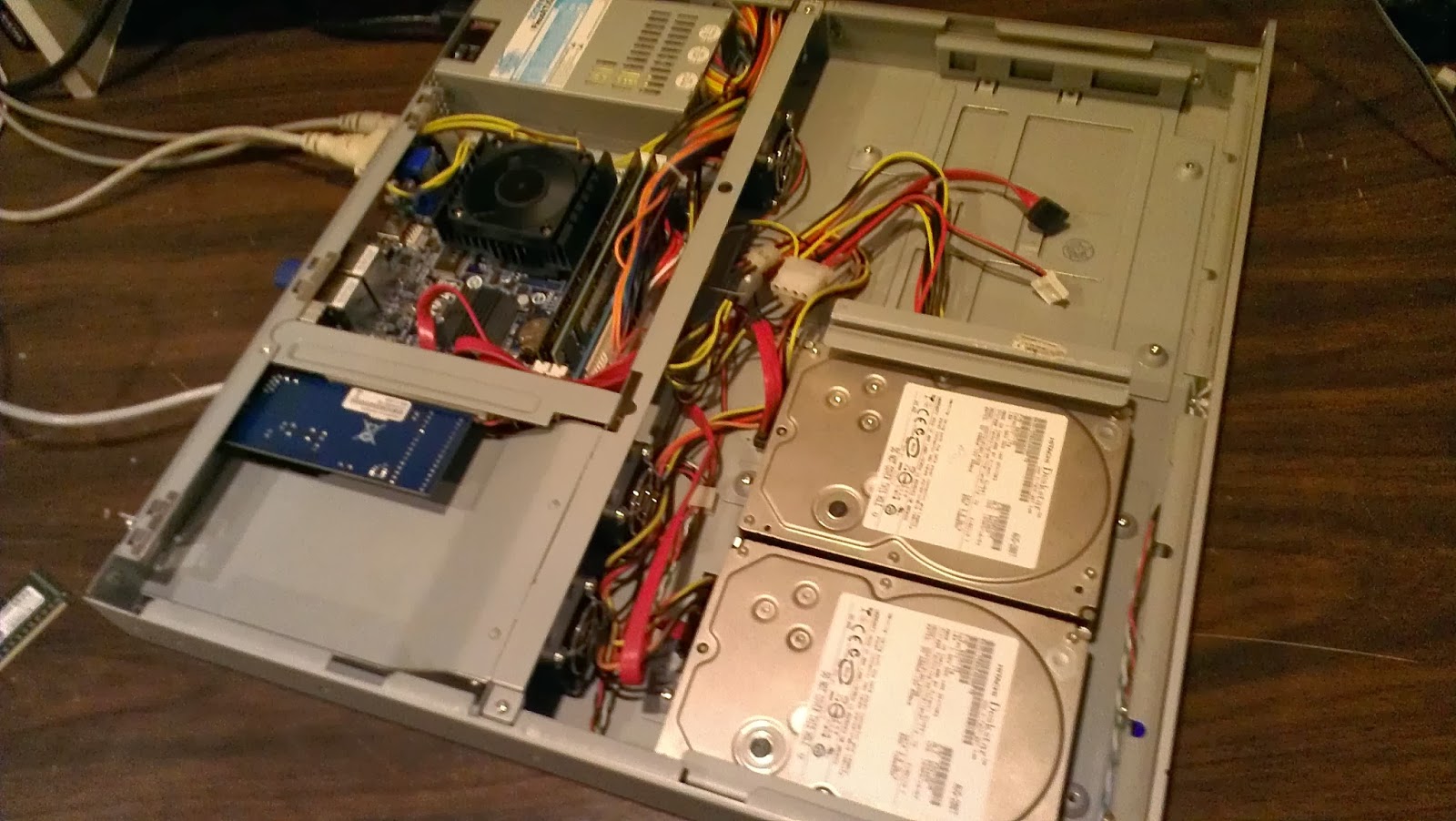
I got a Lacie 1U NAS from a customer, it unfortunately died,
the cpu fan quit working and the poor little Atom proc. melted itself.
So basically I got a 1U ITX case and power supply for free. This
gave me a good excuse to redo my shared storage in my home lab. My
requirements are that it have low power consumption, cheap, support iSCSI, and
cheap.
I shopped around a bit for an ITX
motherboard. I settled on the Gigabyte GA-C1037n. I paid roughly
$103 for it shipped. I choose this board because it has dual 1gbps NICs,
it has more than one desktop ram slot, supports 16gb of ram (unfortunately it
doesn't do ECC), it has an expansion slot (albeit 32-bit PCI an not PCI-X).
It only has three SATA ports, one of which is a 6gbps port. So I am stuck at three drives, unless I use a SATA controller in the PCI slot, but MEH, if I need more space I will just put bigger drives in. A 64bit cpu, as developers are stopping production of x86 code. This cpu
consumes a mere 17watts! Compare that to a dual core pentium at 65 watts,
or a quad core at 95.
Celeron 1037u 1.8ghz, 1737 cpu mark, 2mb
cache, 17w
Celeron 1007u 1.5ghz, 1379 cpu mark, 2mb
cache, 17w
Atom D2700 2.1ghz 841cpu mark, 1mb cache,
10w
Celeron 847 1.1ghz, 985 cpu mark, 2mb
cache, 17w
Intel e2160 Core2Duo 1.8ghz, 996 cpu mark, 1mb cache, 65w
Intel e2160 Core2Duo 1.8ghz, 996 cpu mark, 1mb cache, 65w
The ram was kinda sort free, as they were
pulls from other projects, so 6gb PC3 total (4gb & 2gb). One
day it will get upgraded to 16gb. Unfortunately it is highly recommended
to NOT run the ZFS file system with less than 8gb. So UFS and 6gb for the
time being, but more on that part later.
FreeNAS 9.2.1 was installed on a 4gb USB thumb drive; turns out that a few of my 2gb drives (which is all that is required) where just a few bytes too small. Two 1tb 7200rpm SATA drives are installed. I added a Trendnet PCI 1gbps NIC, as I think what I want is to have this NIC for management, NTP, CIFS, etc. The two onboards I will dedicated to iSCSI traffic, which is on a separate VLAN.

New Genre of Computer Virus
I stumbled upon a new genre of computer virus today. The client called in saying printing was slow on their terminal server. I logged onto their terminal server; noticed the whole machine was rather slow. Noticed in task manager that 100% of the CPU was consumed by an a program called "sysctrl32.exe" also noticed that there were four users logged in, each one had one instance of this program consuming 25%. Researching this program came up with almost no results. I then ran an Eset OnLine Virus scan, and it found a trojan. Turns out this is a virus that mines BitCoins for some cybercriminal! Brilliant! Kinda wish I had thought of it! :)

Subscribe to:
Posts (Atom)