Some may have noticed a plethora of ads for Veem lately, and many of them say their product is free. Well what it really is, that you get there full blown software for a trial period, but at the end of the trial you get to keep their "free software" Veeam Zip.
Veeam Zip, is a program to backup VM's into a single file. It cannot be scheduled (at least through the GUI), there is no job log to go back to, one cannot include or exclude files, folders, or drives, it is the whole VM or nothing.
Once the trial period ends, changing the configuration becomes difficult. For instance, I had a test ESXi server up for a while. I cannot remove that test server from the Veeam GUI because it says it is in use by job "backup job1". Ok, so I will just delete the backup job, Oh wait, can't do that because that portion of the program has been been crippled.
It is CPU intensive for the backup server. I had two vCPU's assigned to the backup server and during the jobs it would have both of them at 100% utilized. Upgrading to four vCPU's, made the backup job go faster and all four vCPU's hovered around 80% used. In this test my throughput went from roughly 30Mbps to 38Mbps. At this point Veeam reported that the "source" (meaning the source VM) was the bottle neck, which could be as the VM being backuped up as well as the backup server both live on a set of mirrored SATA drives.
How it works. Once a job is started. 1. A Vmware snapshot is taken of the target VM. 2. The original VMDK for that target VM is mounted to backup server. 3. The backup takes place. 4. Target VMDKs are unmounted, ESX merges the snapshots.
I did play with the compression settings a bit. Veeam does get ride of white space and the swap file, then compresses the backup. Some of the VM's I was backing up saw roughly 30% decrease in space. Switching the compression to maximum added another 5 minutes to a 15 minute job and took the backup file from 7.3gb down to 6.5gb.
Veeam Zip is a cool tool. I forse using it instead of copying VMDK's around, or other ways to migrate VM's to different ESXi servers. Or using it for a monthly backup in addition to another method; I am thinking of some smaller clients who are only using Agent/file based backup programs and aren't willing to spend the money to upgrade their software.
<pics to follow>
http://www.veeam.com/virtual-machine-backup-solution-free.html

FreeNAS usage part1
For a quick test I used Veeam Zip 7.0.x to backup my VM's to the FreeNAS. Electricity usage spiked at 71 watts, at rest the server consumes a mere 61 watts. It looks as though we are getting 30~40Mbps sustained transfer rates, Veeam showed spikes up to 70Mbps. Currently, assuming I am reading the graphs right it is not CPU or ram bound, that being said perhaps I will switch to ZFS. Also I don't have LACP/RoundRobin, or any sort of load balancing between the NICs on the FreeNAS. I have ESXi set up to use RoundRobin on two NICs.


FreeNAS build
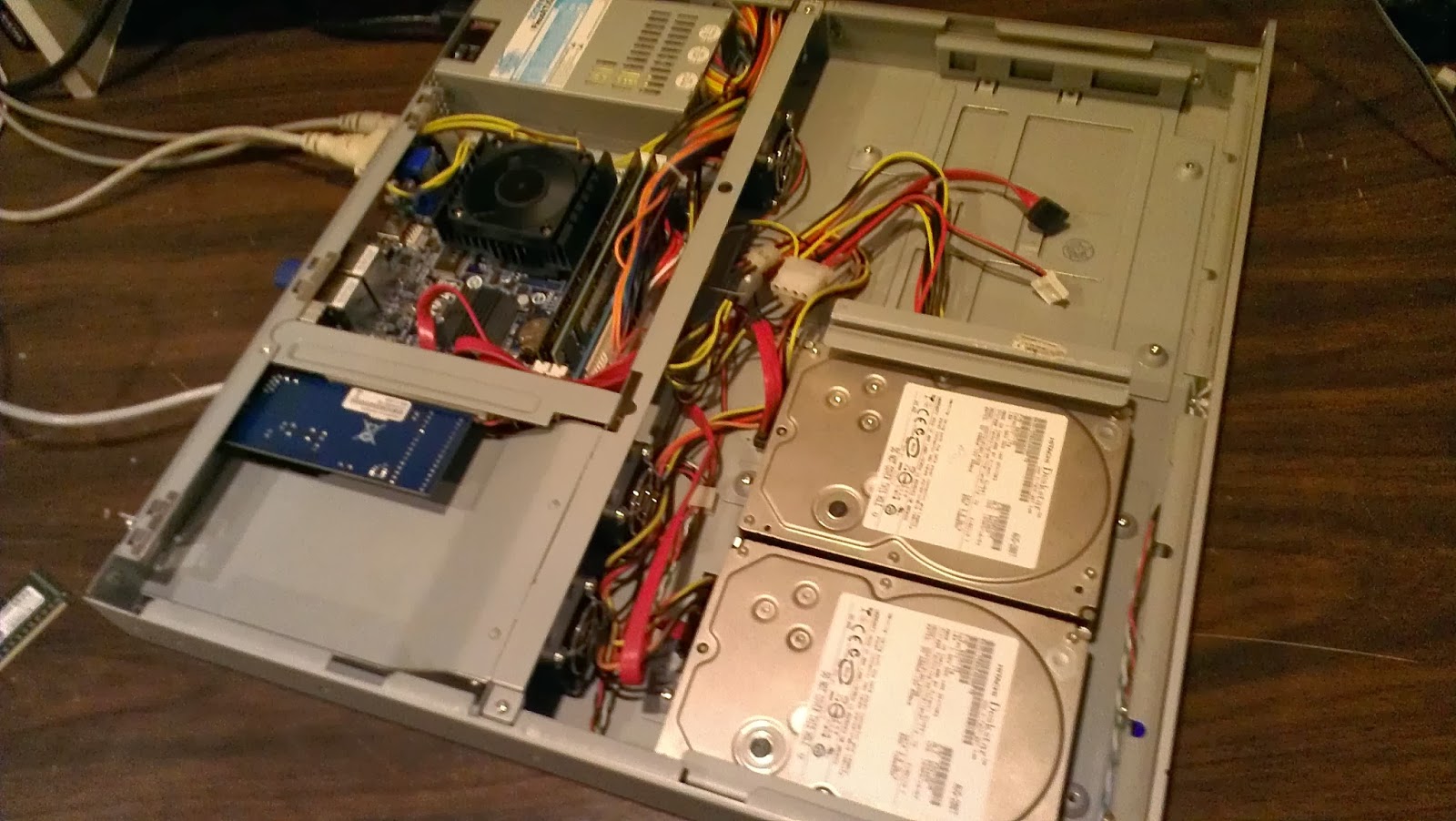
I got a Lacie 1U NAS from a customer, it unfortunately died,
the cpu fan quit working and the poor little Atom proc. melted itself.
So basically I got a 1U ITX case and power supply for free. This
gave me a good excuse to redo my shared storage in my home lab. My
requirements are that it have low power consumption, cheap, support iSCSI, and
cheap.
I shopped around a bit for an ITX
motherboard. I settled on the Gigabyte GA-C1037n. I paid roughly
$103 for it shipped. I choose this board because it has dual 1gbps NICs,
it has more than one desktop ram slot, supports 16gb of ram (unfortunately it
doesn't do ECC), it has an expansion slot (albeit 32-bit PCI an not PCI-X).
It only has three SATA ports, one of which is a 6gbps port. So I am stuck at three drives, unless I use a SATA controller in the PCI slot, but MEH, if I need more space I will just put bigger drives in. A 64bit cpu, as developers are stopping production of x86 code. This cpu
consumes a mere 17watts! Compare that to a dual core pentium at 65 watts,
or a quad core at 95.
Celeron 1037u 1.8ghz, 1737 cpu mark, 2mb
cache, 17w
Celeron 1007u 1.5ghz, 1379 cpu mark, 2mb
cache, 17w
Atom D2700 2.1ghz 841cpu mark, 1mb cache,
10w
Celeron 847 1.1ghz, 985 cpu mark, 2mb
cache, 17w
Intel e2160 Core2Duo 1.8ghz, 996 cpu mark, 1mb cache, 65w
Intel e2160 Core2Duo 1.8ghz, 996 cpu mark, 1mb cache, 65w
The ram was kinda sort free, as they were
pulls from other projects, so 6gb PC3 total (4gb & 2gb). One
day it will get upgraded to 16gb. Unfortunately it is highly recommended
to NOT run the ZFS file system with less than 8gb. So UFS and 6gb for the
time being, but more on that part later.
FreeNAS 9.2.1 was installed on a 4gb USB thumb drive; turns out that a few of my 2gb drives (which is all that is required) where just a few bytes too small. Two 1tb 7200rpm SATA drives are installed. I added a Trendnet PCI 1gbps NIC, as I think what I want is to have this NIC for management, NTP, CIFS, etc. The two onboards I will dedicated to iSCSI traffic, which is on a separate VLAN.

New Genre of Computer Virus
I stumbled upon a new genre of computer virus today. The client called in saying printing was slow on their terminal server. I logged onto their terminal server; noticed the whole machine was rather slow. Noticed in task manager that 100% of the CPU was consumed by an a program called "sysctrl32.exe" also noticed that there were four users logged in, each one had one instance of this program consuming 25%. Researching this program came up with almost no results. I then ran an Eset OnLine Virus scan, and it found a trojan. Turns out this is a virus that mines BitCoins for some cybercriminal! Brilliant! Kinda wish I had thought of it! :)

Shortcomings and notes of Backup-Exec 2012
-Simplified Disaster Recovery-It is a great idea. To recover a damaged machine, simply boot up off a DVD that has a Windows PE environment, point it at either the Backup Exec Server (BES) OR the Backup Exec backup files, and hit restore. This is huge time saver; no longer does one need to install the OS, then install BES, then cat catalog the backup media, then restore.
However, this relies on the existence on a ".DR" file. This file is ONLY created at the last full complete and successful backup. So if the job has been erroring out for a while, you may be restoring from really old backups. One cannot restore just the Windows System State, one must restore the system state with the entire c-drive. Symantec's response on this is, that the system state requires files along w/ the registry and what not. My response is well, yes, duh! So when I click system state, it should backup/restore all that is necessary for a System State. If I wanted to restore just a file out of there, say NTDIS.dat, I would choose that.
-Installing BES on a Active Directory Domain Controller (ADDC)-DON'T DO IT! If your active directory gets damaged, and one needs to restore it, it normally requires going into Safe Mode or Directory Services Recovery Mode. Well since BES was installed on a ADDC all of the services and backup jobs are tied to that AD account. While one can get BES to launched by manipulating what credentials get used to start the service. The backup jobs/media can be a different story. Eventually in this particular case we had to rebuild the machine from scratch, and change the name of the machine to that of the previous machine, and put the DNS name in to "trick BES. Then I was able to do a restore. For this client, I am started using Windows Backup to backup the system state in addition to BES.
However, this relies on the existence on a ".DR" file. This file is ONLY created at the last full complete and successful backup. So if the job has been erroring out for a while, you may be restoring from really old backups. One cannot restore just the Windows System State, one must restore the system state with the entire c-drive. Symantec's response on this is, that the system state requires files along w/ the registry and what not. My response is well, yes, duh! So when I click system state, it should backup/restore all that is necessary for a System State. If I wanted to restore just a file out of there, say NTDIS.dat, I would choose that.
-Installing BES on a Active Directory Domain Controller (ADDC)-DON'T DO IT! If your active directory gets damaged, and one needs to restore it, it normally requires going into Safe Mode or Directory Services Recovery Mode. Well since BES was installed on a ADDC all of the services and backup jobs are tied to that AD account. While one can get BES to launched by manipulating what credentials get used to start the service. The backup jobs/media can be a different story. Eventually in this particular case we had to rebuild the machine from scratch, and change the name of the machine to that of the previous machine, and put the DNS name in to "trick BES. Then I was able to do a restore. For this client, I am started using Windows Backup to backup the system state in addition to BES.
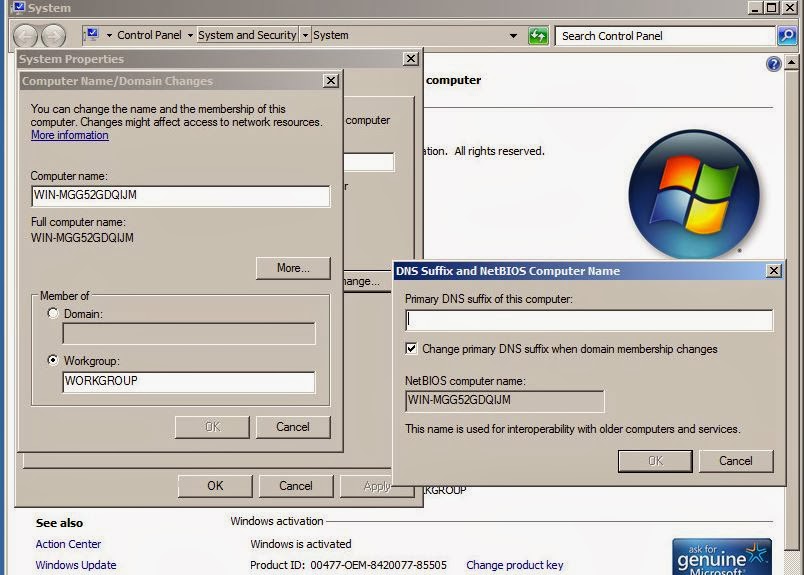
Oh, and changing the name of the machine, or changing it domain membership, usually breaks BES. After fighting this issue for a while, we simply just uninstalled and reinstalled. Supposedly it is an issue with SQL Express.
Symantec claims that restores can be done to dissimilar hardware. Thus far I cannot get it to work. We tried taking an SBS 2003 VM, and restoring it to a physical machine. On a HP ML350 G5, the machine would boot to a black screen w/ a star moving across that would say "setup is preparing your computer". Then a Dell PowerEdge 1900, we could never get past the disk partitioning portion. We got past on the HP by manually preparing the volumes just as they were on the original machine. Even restoring to a blank VM gave us grief. At this point we bailed.
Reasons why Hyper-V is inferior to Vmware
****this post is unpolished, and will be randomly updated*******
I keep seeing traffic saying that Microsoft's Virtualization is free, or at least cheaper than Vmware. Well, I going to make an attempt at debunking those statements. Before anyone just dismisses this post on the merit of me simply being a Vmware fanboi; let me say that I was running Microsoft Virtual Server for years on my home lab dual Intel Pentium III server. Yes that goes way back, even before the name change to Hyper-V. Currently I am assisting in the administration of a small 2012 Hyper-V server farm. Also I love the fact that another company is competing seriously with Vmware. Competition keeps companies progressing in features and keeps costs "down".
I keep seeing traffic saying that Microsoft's Virtualization is free, or at least cheaper than Vmware. Well, I going to make an attempt at debunking those statements. Before anyone just dismisses this post on the merit of me simply being a Vmware fanboi; let me say that I was running Microsoft Virtual Server for years on my home lab dual Intel Pentium III server. Yes that goes way back, even before the name change to Hyper-V. Currently I am assisting in the administration of a small 2012 Hyper-V server farm. Also I love the fact that another company is competing seriously with Vmware. Competition keeps companies progressing in features and keeps costs "down".
Anti-Virus: Because Windows is the hypervisor, it should have Antivirus protection on it. Their is a financial cost to having one more AV license, plus installing it consumes more ram, processor, and hard drive space, that should be used for VM's. Vmware's ESXi is a harden appliance with almost no attack surface.
Backup: Because Windows is the hypervisor, it should be backed up. This adds the cost of another backup agent, and the cost of space of backing up one more machine. One could argue, well to do it right the Windows HV host should ONLY be doing HV, and nothing else; therefore if it breaks it is easy to rebuild if necessary. I fully agree, however, how long does it take to install Windows 2012, activate it, install all the updates, install AV, configure the HV roll? Four hours? Six hours?
ESXi can be installed in under an hour. ESXi because it is so small, and so quick and easy to install the vast majority of implementations don't bother backing it up the host. For those that want to there is a command that dumps out the configuration out to a text file that can be imported at a later time. The ESXi OS is so small that many installs are put on to a 2gb USB thumb drive/SD card.
Memory efficiency: Because one must install Windows 2012/2008 on the bare metal, it consumes more ram, not to mention hard drive space; space better suited for VMs. The ESXi OS is so small that many installs are put on to a 2gb USB thumb drive/SD card. The ram footprint is usually less than 1gb. A 2gb minimum requirement is there to actually install ESXi.
Hyper-V is simply not as efficient with ram as Vmware. For instance, I have a client with a brand new install of Server 2012r2 running HV, in this case the host is also a member AD server. It has 16gb of ram. It has one Server 2008r2 VM with 10gb of ram assigned to it. There are to XP VM's, one with 2gb and one with 1gb of ram assigned to them. So 10 +2 +1 = 13gb of VM's leaving 3gb for the 2012 host, no problem right? WRONG! I cannot get both XP VM's to run at the same time, as there isn't enough ram. Later on I was able to change the start up ram on both XP machines to 1gb, and change the dynamic ram to 512mb as a minimum and a 2gb maximum; this got all three machines to run simostainlsy. With ESXi one could "over allocate" ram and run more than 16gb of allocated virtual ram. In fact I often tell customers that they should be over allocating by 20%, but that is another post all to itself.

Vmware has Transparent Page file-where if more than one VM has a file in ram, and it is identical for another VM, only one copy of that file is stored in ram, and pointers assigned to it. Memory compression-files in ram are actually compressed (kinda like WinZip). Memory Balloon driver-if the host is running low on ram, it will trick the VM to move files in ram that are seldomly accessed to its swap file (aka Windows Swap file, of the VM).
CloudCred
Here is a "fun" way to learn about cloud related technology. It is sponsored by VMware, but it is somewhat vendor agnostic. For instance there is Amazon's AWS tasks.
Vmware Certified Professional..now called VCP5-DCV
I finally signed up and took the Install/Configure/Manage class for VMware. This class costs an MSRP of $3850, lasts apx. 40 hours, and is required to take if one wants to take the VCP certification test.
So
I kind of new some of this, but it is more clear now. IMHO,
it was more of a Vmware 101-105 class. It only scratches the surface in
preparing one for the exam. For instance, I took a practice exam, literally only a dozen questions out of the 60 where
covered in the class. Our instructor admitted that in order to truly prepare
for the exam one should take the Optimize/Trouble shoot class and the install
class will not adequately prepare one for the exam. Sadly it is another week
long coarse; however what it does is it goes deep into the features we don’t
use, as all of our customer fall into the SMB category, thusly as do our skill
sets. We never use technologies such as Site Recovery Manager, Fault Tolerance,
or the NV1000 to name a few.
Great article talking about some of the differences in the VCP program and vSphere v5.5 changes.
Great article talking about some of the differences in the VCP program and vSphere v5.5 changes.
VMware
Partner Exchange…….
-Early
registration ends Jan. 6th (save $600)----exams are 75% off when taken there!
----Boot camp classes are 60% off (the optimize class is not offered, there are some View classes)
ESXi v5.5 and SSD's
Two great new features with v5.5:
VSAN: This is a dynamic shift if storage methodology, for the past 10 years or so we have been pushing people to shared storage SAN & NAS, for many reasons; flexibility, speed, shared access, dynamic sizing, etc.. etc.. Also if one wanted to take advantage high availability aka vMotion (where your virtual machine can float between VMware servers).
No longer does one need shared storage for a Highly Available VMware cluster! VSAN is essentially another software SAN that lives on ESXi. I did say "another"; products like LeftHand/HP VSA, RocketVault, even FreeNAS, and OpenFiler, just to name a few. Even VMware tried this once before, their VSA appliance was tried, and was ultimately given a death sentence. VMware's VSA's weak points were that it was limited to three hosts and the licensing costs neared what one could buy an entry level SAN for.
So how does VSAN differ than VSA or any other software storage product? It uses 3 to 8 nodes to contribute to the storage pool; note any number of devices can attach to the storage pool. Also each contributing server needs to have direct attached storage and SSD. Lastly, this product is integrated in the hypervisor, it is not an appliance/VM running on top of the hypervisor.
At the time of writing this blog, the product has been in beta for quite sometime, since VMworld 2013. The beta is a free and open product to test. I don't like that one NEEDS to have SSDs; I understand why, the whole reason is to make replication and higher IOPs. It is just that enterprise level SSD is expensive. It also is a pain that one must have at least three hosts; the reason for it is to prevent the 'split brain syndrome' (where there is a disconnect, and both parties think they are the 'master'). Lastly, official pricing/licensing hasn't been released but more than likely it will be an advanced feature that won't be offered in the Essentials/Standard packages. Those three things make it harder for the SMB to deploy this feature. It is easier to justify spending dollars on a box where one can point to and say that: "this is what we spent $20k" on vs. PDF file with license numbers on it.
Speaking with a peer, they were testing using Intel 910 PCIE SSD cards, and their results showed that VSAN was much faster than their NetApp. Which proves the theory that moving storage back to local host, closer to where it is needed can be faster.
FLASH READ CACHE: http://www.vmware.com/products/vsphere/features/flash.html In a nut shell if there is SSD in the system one can set a chunk of that drive aside to be used as cache for any/each VMDK to be used as cache. It is only read-cache, not write cache. It is set at the VM level; there is no cluster/vAPP wide setting that can quickly be applied. So if one has dozens of VM's this becomes a pain.
In my lab, I was about to deploy this feature, however like all v5.5 new features it can only be manipulated in the Web Client, it can only be configured for VM's of hardware level 10 VM's; again flipping a VM to hardware level 10 means that it cannot be manipulated via the thick/c# client. Also the SSD drive must be blank before enabling it. In my lab I already the SSD drive in use by Host Cache and moved all of the VM's swap file to the SSD. Eventually I will get around to undoing those settings, formatting the SSD drive, turning on Flash Read Cache, then turn Host Cache, and relocate the swap files to SSD. This SSD drive is now unavailable for anything else; Flash Read cash, and host cache, it is not a datastore, so one cannot relocate VM swap files there or anything else.
VSAN: This is a dynamic shift if storage methodology, for the past 10 years or so we have been pushing people to shared storage SAN & NAS, for many reasons; flexibility, speed, shared access, dynamic sizing, etc.. etc.. Also if one wanted to take advantage high availability aka vMotion (where your virtual machine can float between VMware servers).
No longer does one need shared storage for a Highly Available VMware cluster! VSAN is essentially another software SAN that lives on ESXi. I did say "another"; products like LeftHand/HP VSA, RocketVault, even FreeNAS, and OpenFiler, just to name a few. Even VMware tried this once before, their VSA appliance was tried, and was ultimately given a death sentence. VMware's VSA's weak points were that it was limited to three hosts and the licensing costs neared what one could buy an entry level SAN for.
So how does VSAN differ than VSA or any other software storage product? It uses 3 to 8 nodes to contribute to the storage pool; note any number of devices can attach to the storage pool. Also each contributing server needs to have direct attached storage and SSD. Lastly, this product is integrated in the hypervisor, it is not an appliance/VM running on top of the hypervisor.
At the time of writing this blog, the product has been in beta for quite sometime, since VMworld 2013. The beta is a free and open product to test. I don't like that one NEEDS to have SSDs; I understand why, the whole reason is to make replication and higher IOPs. It is just that enterprise level SSD is expensive. It also is a pain that one must have at least three hosts; the reason for it is to prevent the 'split brain syndrome' (where there is a disconnect, and both parties think they are the 'master'). Lastly, official pricing/licensing hasn't been released but more than likely it will be an advanced feature that won't be offered in the Essentials/Standard packages. Those three things make it harder for the SMB to deploy this feature. It is easier to justify spending dollars on a box where one can point to and say that: "this is what we spent $20k" on vs. PDF file with license numbers on it.
Speaking with a peer, they were testing using Intel 910 PCIE SSD cards, and their results showed that VSAN was much faster than their NetApp. Which proves the theory that moving storage back to local host, closer to where it is needed can be faster.
FLASH READ CACHE: http://www.vmware.com/products/vsphere/features/flash.html In a nut shell if there is SSD in the system one can set a chunk of that drive aside to be used as cache for any/each VMDK to be used as cache. It is only read-cache, not write cache. It is set at the VM level; there is no cluster/vAPP wide setting that can quickly be applied. So if one has dozens of VM's this becomes a pain.
In my lab, I was about to deploy this feature, however like all v5.5 new features it can only be manipulated in the Web Client, it can only be configured for VM's of hardware level 10 VM's; again flipping a VM to hardware level 10 means that it cannot be manipulated via the thick/c# client. Also the SSD drive must be blank before enabling it. In my lab I already the SSD drive in use by Host Cache and moved all of the VM's swap file to the SSD. Eventually I will get around to undoing those settings, formatting the SSD drive, turning on Flash Read Cache, then turn Host Cache, and relocate the swap files to SSD. This SSD drive is now unavailable for anything else; Flash Read cash, and host cache, it is not a datastore, so one cannot relocate VM swap files there or anything else.
ESXi SSD older RAID hardware
I decided to add an SSD drive to one of my lab ESXi boxes; so I can utilize the Host Cache features, and test out the VMware VSAN beta (which requires SSD). I simply mounted an SSD drive into an HP caddy, booted into HP Offline Array Configuration Utility, made a RAID0 (with only one drive it is the only option), booted into VMware.
ESX did not recognize the drive as an SSD drive. There is a way to force ESX to categorize a drive as SSD, but do I really want to do that? To me if the system doesn't recognize it, there must be underlying issues.
http://pubs.vmware.com/vsphere-50/index.jsp?topic=%2Fcom.vmware.vsphere.storage.doc_50%2FGUID-99BB81AC-5342-45E5-BF67-8D43647FAD31.html
Turns out it is a bug in the Smart Array P400 Firmware when using Vmware. Also it was discovered that this RAID card when dealing w/ SATA devices will only transfer at 1.5Mbps, where SAS is 3Mgbs. Interesting, so will there be much of an improvement it the SSD drive is limited by the 1.5Mbps connection? Also the P400 does not have trim support.
So options:
-attach the SSD drive to the onboard SATA control off of the motherboard, and find a way to MacGyver a way to mount the drive inside of the case but not in the hot swap bay. Oh wait, there isn't any onboard SATA connectors!
-Buy a PCI/PCI-e SATA card, and MacGyver the drive mounting.
-Use an PCI-e SSD drive. Will a consumer grade card work with ESXi? Paying for an enterprise card on the VMware HCL for my lab use is not an option.
-Upgrade the P400 to a P410. Will the volume just be recognized? Second hand cards, with cables, and battery run over $150.
ESX did not recognize the drive as an SSD drive. There is a way to force ESX to categorize a drive as SSD, but do I really want to do that? To me if the system doesn't recognize it, there must be underlying issues.
http://pubs.vmware.com/vsphere-50/index.jsp?topic=%2Fcom.vmware.vsphere.storage.doc_50%2FGUID-99BB81AC-5342-45E5-BF67-8D43647FAD31.html
Turns out it is a bug in the Smart Array P400 Firmware when using Vmware. Also it was discovered that this RAID card when dealing w/ SATA devices will only transfer at 1.5Mbps, where SAS is 3Mgbs. Interesting, so will there be much of an improvement it the SSD drive is limited by the 1.5Mbps connection? Also the P400 does not have trim support.
So options:
-attach the SSD drive to the onboard SATA control off of the motherboard, and find a way to MacGyver a way to mount the drive inside of the case but not in the hot swap bay. Oh wait, there isn't any onboard SATA connectors!
-Buy a PCI/PCI-e SATA card, and MacGyver the drive mounting.
-Use an PCI-e SSD drive. Will a consumer grade card work with ESXi? Paying for an enterprise card on the VMware HCL for my lab use is not an option.
-Upgrade the P400 to a P410. Will the volume just be recognized? Second hand cards, with cables, and battery run over $150.
Subscribe to:
Posts (Atom)