Anyone find it odd that both VMware AND Broadcom both sponsor Formula 1 cars, but two different teams? BTW for those of you not familiar, Broadcom is in the process of taking VMware over.


Here is a bit how on how VMware is helping out McLaren.
Anyone find it odd that both VMware AND Broadcom both sponsor Formula 1 cars, but two different teams? BTW for those of you not familiar, Broadcom is in the process of taking VMware over.
Controlling the amount of electricity being used in computing use has become increasingly more important over the years. Wither it is in the home lab, and the consumption directly affect one's own pocket book or the datacenter/server room has heating or power limitations.
In this case I thought it might be interesting to look at what impact of networking speed has on electrical use. One could conclude from simply looking at number of and size of the heatsink on the cards that there must be a difference. For this test my trusty Kill-A-Watt was pulled out of storage. A normal desktop was used, a Dell 3rd Gen i3, the specifics are irrelevant. Each time the machine was booted off of USB thumb drive into "Parted Magic" (a Linux Rescue Utility); I chose that OS over using Windows so other variables such as drive indexing or Windows Updates wouldn't skew the results. The machine was left to idle for 5 minutes to let things settle down before measurements where taken. Extra GBICs where removed, and the same DAC cable was used. The machine was plugged into a 10gb switch; no 25gb switch was available for testing, donations are welcome! :)
Bare machine: (no additional hardware) = 32watts
Machine w/ 10g Intel i520 NIC no cable =35watts
Machine w/ 10g Intel i520 NIC w/ cable =37watts
Machine w/ 25g Mellanox CX4 NIC no cable =40watts
Machine w/ 25g Mellanox CX4 NIC w/ cable =42watts
Machine w/ 25g Mellanox CX5 NIC w/ cable =41watts
Machine w/ 25g Broadcomm BCM51414 w/ cable =41watts
Machine w/ 25g Chelsio w/ cable =49watt (very hot to the touch!)


More electronic recycling. This Watchguard M270 firewall, while is still supported and the latest code works on it, it was sent out for scrap! So let's take a closer look at it.
This device had customer data on it, I didn't know the password, nor the IP scheme. Next I attached to the console port, and rebooted it into the recovery mode, I didn't find a password reset option. So a factory reset had to be done.
1. Power off the Firebox.
2. Press and hold the Reset button on the back of the Firebox.
3. While you continue to hold the Reset button, power on the Firebox.
4. Continue to press the Reset button until the Attn indicator begins to flash.
5. Release the Reset button. ...
6. Wait for the reset process to complete.
Once done, open a web browser to https://10.0.1.1:8080, use credentials admin & readwrite
Sadly the feature keys for this product are now gone. I didn't realize the reset would wipe them. The box will not download it's key from the Watchguard mothership, it complains about being expired. Now the box is pretty much useless as a Watchguard, as it will only allow one client to get through the network. I have seen some people run PFsense on this hardware, so that could be an option.
Interesting observations:
-there is a way to get into the BIOS via the console cable, but no one seem to know the password. There is a way to re-flash it.
-CPU: Intel Atom C3558 @ 2.2ghz, 4 core, 4 threads, 16watt, BenchMark 2417
-Memory: 4gb RAM DDR3 sodimm
-Hard drive: 16gb mSATA
-Marvell 2.5gbps ports? I saw mentioning of this during boot, but that might be an internal switch or something, as from the command line and the GUI all the ports report as 1Gpbs
-the power supply is a "wall wart"....the big plastic transformer/power supply is actually inside of the case, and the barrel plug fits into the system board. Interesting! I guess it makes replacement simpler, and from installation point of view I'd rather rack a full width appliance vs. a smaller one and then have to deal with securing the external transformer/power supply somewhere else in the rack.


Finally getting around to this project again.
TrueNAS Core 13.05 was installed onto the 64gb SSD drive. The eight Evo 840 1tb drives were set up into two groups of four RAIDz2 pools, then mirrored. The drives have a lot of hours on them, so I could arrange them better IOPs or space, but I am going error on the side of caution here and go for higher resiliency. The usable space is around 3.5tb.
One of the 1gb cards was setup with a static IP address. The Mellanox 40gb card was setup with a different IP arrange. The rack that this system will live in has a Dell Force10 switch that has six 40gb ports (two of setup in a trunk for uplink) and forty-eight 10gb ports, there also is a separate 1gb switch.
Then iSCSI service was started, bound to the 40gb interface. A zPool, portal, target, and extents were setup. For the meantime a Dell r730 running VMware ESXi v7.x with a single 10gb interface was setup for iSCSI. The connections was made, the datastore presented. Storage vMotion a Windows11 VM to the TrueNAS, and ran Atto Disk Benchmark.


I have eight Samsung Evo 940 SSD 1tb drives that needed a deserving home; so I decided to build another TrueNAS to server as a VMware shared storage appliance. A Dell PowerEdge r620 server was picked out a to use, as it had eight 2.5" drive bays. The dual CPU's e5-2650's should be way more horse power needed to be an ISCSI/NFS target. Eventually they will be upgraded to v2 CPU's as they are stupid cheap on eBay and it is roughly 30% more performance with no extra electricity.
An Intel 64gb SSD was brought out of retirement, installed into a slim-CDROM to 2.5" HDD adapter. This would be where the OS will be installed. However first, I installed Windows Server to it just to test out the hardware and then update the firmware.
First issue I ran into is that even though this server has eight 2.5" drive bays, the backplane only had four drive connectors! I have seen other r620's with only four drive bays, but the other side was a metal face, this one had drive sled in it! Interesting! As luck would have it I found another r620, that had a backplane that did have all 8 drive connectors but was only two hard drives, so the back plane got swapped.


Decided to do a little bit of network benchmarking.
Both nodes have a VM setup on them, both VMs live on NVMe.
First test is both VMs talking to each other over the built in 10gb NICs. In the part #1 it was mentioned that this server has network backplane for the two nodes to communicate, using Intel 10gb NIC hardware.


This 2U server holds two compute nodes and has a shared backplane to 24 U.2 dual path NVMe drives.


Each compute node has a X11DSN-ts motherboard, containing a M.2 slot, twelve DDR4 memory slots, dual LGA-3647 sockets (this one has Xeon Gold 6140 CPU's). For networking they have two Intel 1gb/10gb RJ45 NICs plus two more Intel 10gb NICs that are strictly node-to-node communication.


A datastore was created using one of the U.2 NVMe drives on host-A. Host-B didn't pick up this datastore until after a reboot. I am sure there is someway of refreshing how ESXi scans for new/existing datastores that are local. Additional disks to the datastore were added as an extent on host A. Host B automatically picked up the size increase, without having to reboot.
A VM on host-A was stood up; host-B could not register that VM until it was shutdown. After registering the VM on host B, host A did not seem to care or know anything was different, other than it still showed the VM as powered off. Rebooting host A shows those VMs as invalid. VMware file locking is taking affect in the background. After shutting down the VM, waiting a few minutes, refreshing the screen, that VM could not be powered on; on host-A. It appears the only way to bring the VM back to the original host is to unregister the VM and register it.

A couple of quick notes...
The controller WILL support larger than 4tb drives. I have used both Seagate ST6000nm0034 6tb drives and Seagate Exos 12tb SAS drives.
The ROM utility will misreport the drives, but do not worry.


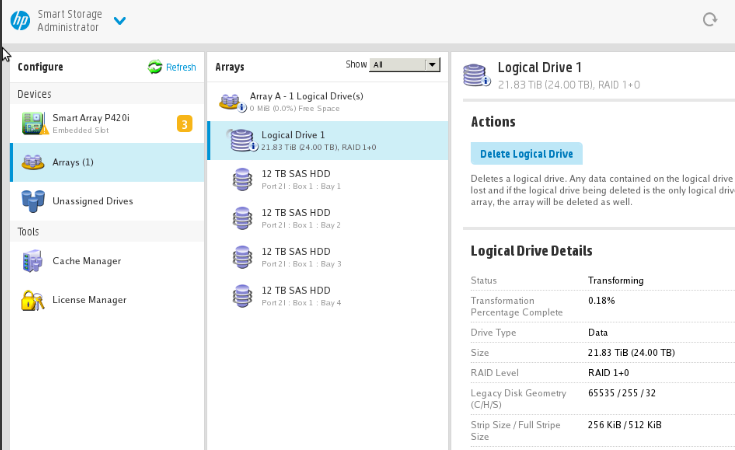

Just a bunch of notes for my future self, as I am sure I will forget, and for anyone else who may benefit.
What is a namespace? Think of it just like a partition on a normal hard drive. Except the partitioning of the drive is done at the hard drive level not at the operating system level. Thus the operating system sees the name spaces as unique hard drives. IE if one had a 1tb NVMe, and setup four 256gb name spaces, Windows would think there was four 256gb NVMe drives in the system.
FROM LINUX (PartedMagic was used):
nvme list <--show what nvme name spaces are present and the model of the drive
nvme id-ctrl /dev/nvme0 | grep mcap <--shows" tnvmcap (total NVM capacity) and unvmcap (unallocated NVM capacity) attributes.
nvme id-ctrl /dev/nvme0 | grep cntlid <--show the controller(s) ID's
DELETE NAMENSPACES
nvme detach-ns /dev/nvme0 –n 1 –c 0 <-- detaches the namespace "1" from the controller "0"
sometimes using the flag --controllers=0 is necessary
nvme delete-ns /dev/nvme0 -n 1 <--deletes the namespace "1" from the controller "0"
nvme ns-rescan /dev/nvme0 <--rescans the drive "0"
CREATE NAMESPACES
nvme create-ns /dev/nvme0 -s 26214387 -c 26214387 -b 4096 <--creates a 100gb name space, formatted to 4k
nvme ns-rescan /dev/nvme0 <--rescan
nvme attach-ns /dev/nvme0 -n 1 -c 0x1 <--attach the namespace to the controller
nvme ns-rescan /dev/nvme0 <--rescan
Ignore this stuff....just notes to me...
nvme detach-ns /dev/nvme0 -n 1 -c 6
detaches namespace 1 from nvme0 from controller 6
nvme delete-ns -n 1 /dev/nvme0
deletes namespace1 from nvme0
nvme create-ns /dev/nvme0 -s 15,000,000,000 -b 512
creates a namespace of 7.86tb w/ 512 sector size
nvme attach-ns /dev/nvme0 -n 1 -c 6
attaches namespace 1 to controller 6 on nvme0
size:
size in mb...IE 7.68tb =7,680,000,000,000
take that number dived by 4096 or 512, if there is a remainder, subtract the remainder from the original size, and divide again.
7,680,000,000,000/512=15,000,000,000
